


Infocar - OBD2 ELM Scanner
3.8232.00 Reviews
App Specs
- Version
- 2.29.5
- Updated On
- License
- Free
- Downloads
- 10,000,000+
- Developer
- Infocar Co., Ltd.
- Categories
- Auto & Vehicles
- Platform
- Android, iOS
Screenshots
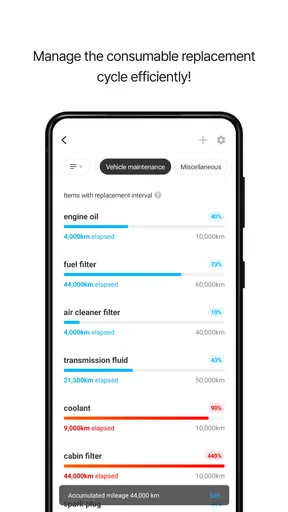
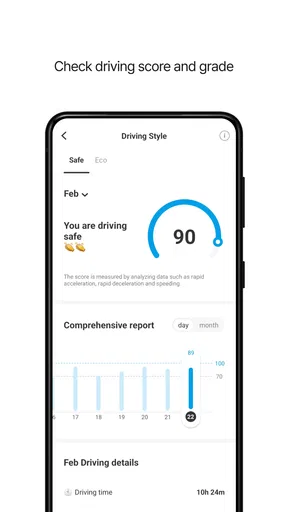
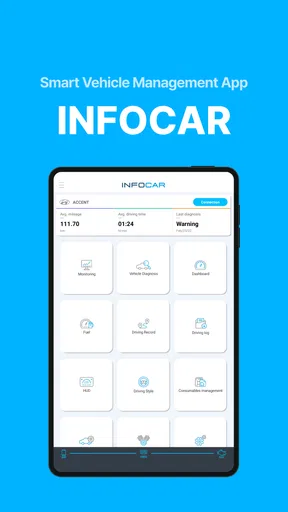
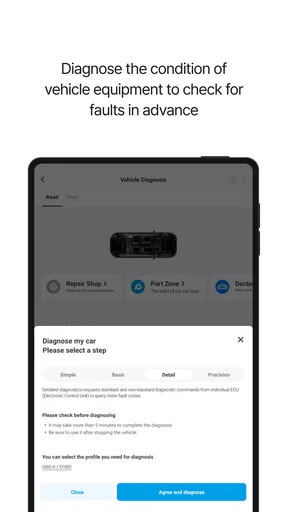
 Analysis by AppCompare
I judge a car diagnostic app less by how many gauges it can put on a screen and more by what happens when I need an answer in an ordinary moment: a warning light appears, the engine sounds different, or I want to know whether a garage’s explanation makes sense. Infocar - OBD2 ELM Scanner is built around that kind of practical curiosity. It gives drivers a way to read information through an OBD2 adapter, but the connection is part of the experience, not a detail to ignore. Before relying on it, I’d make sure the adapter and phone are paired and working while the car is safely parked.
What the connection can—and cannot—tell you
An OBD2 app depends on a chain: the vehicle has to provide the relevant information, the adapter has to communicate with it, and the phone has to maintain a connection. If any link is unavailable, a blank reading or a failed connection does not automatically mean the car has a new fault. I find it useful to separate a problem with the connection from a warning reported by the vehicle; that simple distinction can stop a small technical hiccup from becoming needless worry.
The app is most helpful when I treat its readings as a starting point rather than a mechanic’s verdict. A code can give me better language for describing a symptom, and live values can make a change easier to notice, but neither replaces an inspection when a vehicle behaves dangerously or a warning needs urgent attention. Clearing a fault code deserves particular care: removing the displayed warning is not the same as fixing the cause. I would record the code and the circumstances first, then decide whether clearing it is appropriate.
A useful tool in the right mobile setting
Using a phone beside a car is different from checking an ordinary app at home. I’d connect while parked, keep the phone within reach, and avoid trying to navigate menus while driving. Live vehicle information may be interesting on a commute, but it is not worth taking attention away from the road. If I want to compare a reading or inspect a dashboard layout, a driveway or parking space is a much better place to do it.
It also helps to think through the setting before a trip. If I’m troubleshooting away from home, I want the adapter ready and the app open before I start interpreting anything. A weak or interrupted phone-to-adapter connection can make a live display unreliable at exactly the wrong moment. For a roadside concern, my first priority would still be personal safety and appropriate assistance; an app can help me communicate what I’ve noticed, but it shouldn’t encourage me to keep driving when the car feels unsafe.
Getting Started with Infocar
First things first, setting up Infocar - OBD2 ELM Scanner was a breeze. All you need is an OBD2 adapter, which you plug into your car’s diagnostic port. Once that's done, the app connects seamlessly via Bluetooth. Trust me, if I can do it, anyone can.
Features That Stand Out
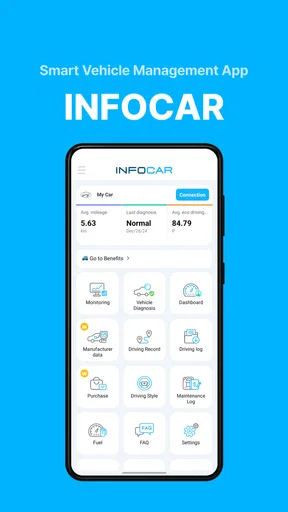
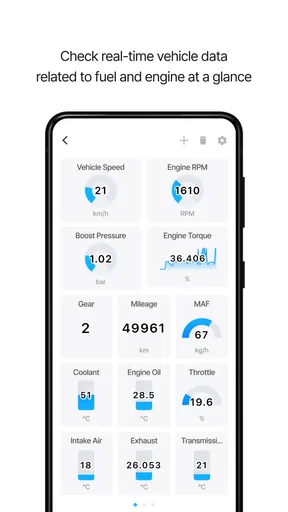
Once connected, the app opens up a world of information about your car. It's like peeling back the layers of an onion, revealing all the juicy details hidden beneath the hood. The app's interface is user-friendly, with a clean design that even tech novices can navigate. The dashboard gives you real-time data on speed, RPM, fuel consumption, and more. It's like having your personal pit crew right there on your phone.
Worth Reading Before You Choose

Switching to Android Auto Means Rethinking Your Driving Routine

Google Calendar Makes a Crowded Week Easier to Manage

Baby Panda World Brings Quick Play to Modern Phones, but Its Game Library Feels Busy

ESPN’s Live Game View Makes Following Close Games Easier

QuizzLand Review: A Good Fit for Short Trivia Breaks, Not Every Player

Basketball Stars: Multiplayer Is Fast, but Can It Recover When Matches Go Wrong?
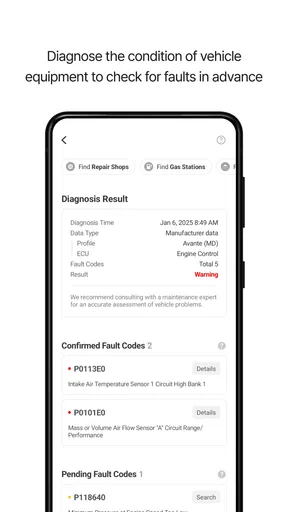
One of the features I found particularly useful is the diagnostic trouble codes (DTC) scanner. Imagine having the power to diagnose issues before they become real problems. The app provides detailed explanations of these codes, so you're not left puzzled and panicked. It even suggests potential solutions, which is great for those of us who aren't exactly car experts.
Diving Deeper into Diagnostics
Beyond the basics, Infocar offers some advanced diagnostic tools that are quite impressive. You can perform an emissions test, which is pretty handy if you're prepping for an inspection. The app also tracks your driving habits over time, providing insights that could help you save on gas and reduce wear and tear on your vehicle.
And let’s not forget the customizable dashboard. You can tailor the display to show exactly what you’re interested in. Want to keep an eye on fuel efficiency? No problem. More concerned about engine temperature? You got it. It’s this flexibility that really sets the app apart for me.
Building a careful troubleshooting habit
A small routine makes the diagnostic features more useful. When a warning appears, I’d note when it happened, whether the engine was cold or warm, and what the car was doing. Then I’d connect, read the code, and save its wording before trying to clear anything. That context can matter: the same displayed code may be easier to discuss with a technician when I can explain whether the symptom occurred during startup, acceleration, or steady driving.
For a used-car viewing, I’d use the app as one part of a broader check, not as a shortcut around a test drive or independent inspection. A code scan can reveal something worth asking about, but a clean screen alone cannot establish that a car is mechanically sound. Likewise, emissions-related readings may help me prepare for an inspection, yet they should not be treated as a guarantee that a vehicle will pass. The practical gain is better-informed questions, not certainty.
Where connection problems change the workflow
If a reading stops updating, I wouldn’t immediately assume the vehicle has developed a fault. I’d park safely, check that the adapter is seated, confirm the phone is still connected to it, and try again. If the connection returns, I’d compare the new reading with the earlier one rather than drawing conclusions from a single moment. If it does not, I’d use the car’s own warning indicators and symptoms as the guide, and seek help if the issue affects safe operation.
This is one reason I’d test the setup before depending on it for a long drive. Pairing an adapter for the first time in a stressful roadside situation is an avoidable frustration. A calm trial at home lets me learn where the diagnostic port is, how the phone connects, and which screens I actually need. It also helps me discover whether my particular adapter and vehicle work well together, instead of assuming every OBD2 combination behaves identically.
What About the User Experience?
Using Infocar feels like having a conversation with your car. The app is intuitive and easy to use, even if you're not particularly tech-savvy. The setup process is straightforward, and the app’s design is both sleek and functional. It’s like the developers knew exactly what we needed before we did.
In terms of performance, the app is responsive and quick. I didn’t experience any lag or connectivity issues, which can be a make-or-break factor for real-time diagnostics. Plus, the regular updates mean the app is always improving, with new features and bug fixes constantly rolling out.
Choosing what to monitor
A customizable display is most useful when I resist the urge to show everything at once. I’d choose only the few values that answer a current question—perhaps engine temperature when investigating a temperature concern, or fuel-related readings when looking into consumption. A focused screen is easier to interpret at a glance while parked, and it reduces the temptation to treat a stream of changing numbers as meaningful without a reason to compare them.
Tracking driving habits can be more informative when I compare similar journeys rather than treating one trip as proof of a trend. Traffic, route, load, and driving conditions can all affect consumption. I’d use the app’s history as a prompt to notice patterns and adjust my habits, not as a precise promise of savings. For someone who simply wants an occasional warning-code explanation, those ongoing records may matter less than the quick scan.
Who will get the most from it
I can see Infocar suiting a driver who likes to understand what a warning light means before calling a garage, an owner who wants to keep an eye on selected live readings, or a hands-on enthusiast who already owns a compatible adapter. It can also help someone prepare a clearer account of a fault: instead of saying only “the engine light came on,” they may be able to share the code and describe when it appeared.
I’d be less likely to recommend it to someone who expects the phone alone to diagnose every vehicle problem, or who wants a fully automatic repair service. It is an OBD2 companion, so the adapter is essential, and interpreting the information still takes judgment. A driver who is uncomfortable with vehicle data may be better served by asking a trusted mechanic to scan the car and explain the result. For complex, safety-critical, or persistent problems, professional diagnosis is the better choice.
How it compares with simpler alternatives
Compared with waiting until a service visit to hear about a warning, an OBD2 app can give me information sooner and help me arrive with more specific questions. Compared with a basic code reader, a phone-based setup can make it easier to view live data and arrange the display around what I want to watch. The trade-off is that I need to manage the adapter and connection, and a phone screen full of readings can be less straightforward than a mechanic’s explanation.
There is also a difference between a general-purpose scanner and specialist diagnostic equipment. Infocar is useful for everyday awareness and basic troubleshooting, but I would not assume it can perform every test or interpret every system that a workshop tool can. The right choice depends on the job: for a first look at a warning or a few live readings, an app can be convenient; for a complicated fault, a repair decision, or confirmation that a car is safe, a qualified technician is more appropriate.
Data, cost, and practical expectations
Because the app can display and track vehicle information, I’d decide what I actually want to monitor rather than collecting readings without a purpose. Keeping a simple note of a recurring code, the date, and the driving conditions may be more useful than trying to interpret every available value. I’d also be thoughtful about where I use the phone and who can see its screen, especially when checking vehicle details in a public place.
Infocar is free to download, though it includes in-app purchases ranging from a few dollars to amounts over two hundred dollars per item. I’d check the purchase details inside the app before paying for anything and first see whether the core scanning workflow meets my needs. Its current version is 2.28.1, and it is intended for devices running Android 7.0 or later. The app is rated for everyone, which says something about its audience, but it does not make every diagnostic result simple to interpret.
Why Infocar Is a Keeper
So, why should you consider using Infocar? In short, it empowers you to understand your car better. With its comprehensive diagnostics, real-time data, and user-friendly interface, it’s a must-have for anyone who wants to be proactive about car maintenance. Whether you're a car enthusiast or just a regular driver looking to save some bucks on mechanic bills, this app is worth every penny.
To wrap it up, Infocar - OBD2 ELM Scanner is more than just an app; it’s a tool that brings peace of mind. Knowing that you can troubleshoot and monitor your vehicle’s health on your own is a game-changer. So go ahead, give it a try, and let your car finally speak to you in a language you understand.
How I’d make the decision
Infocar comes from Infocar Co., Ltd. and sits in the auto-and-vehicle app category. It has a 3.9 average from around 25,000 ratings, with more than 5 million installs, so it has reached a broad audience while leaving room for mixed experiences. I would read that rating as a reason to set realistic expectations: compatibility and usefulness can depend on the car, adapter, and the question I’m trying to answer.
My everyday example is a check-engine light appearing before a routine drive. I’d park, connect the adapter, read and keep the code, and use its explanation to decide what to ask a repair shop. If the car runs normally, that information may help me plan a sensible next step; if it runs roughly, loses power, or shows a serious warning, I would not let an app’s reassuring screen override the symptoms. That distinction is the difference between being informed and taking an unnecessary risk.
For me, the connectivity verdict is practical rather than dramatic: the app is valuable when the phone, adapter, and vehicle cooperate, and less useful when I need an immediate answer without a working connection. Its best role is a portable first look and a way to make routine monitoring more deliberate, not a replacement for mechanical skill or professional diagnosis. If that is what you want—and you are willing to learn the adapter workflow—I think it is worth trying; if you want certainty with no setup or interpretation, I’d choose a mechanic instead.
Pros
- User-friendly interface for easy navigation.
- Comprehensive vehicle diagnostics features.
- Supports multiple car brands and models.
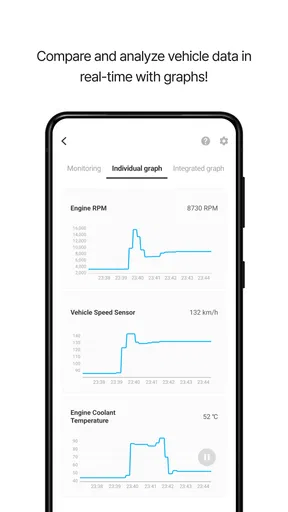
- Real-time data display and logging.
- Affordable compared to similar tools.
Cons
- Requires OBD2 adapter for full functionality.
- Limited features in the free version.
- May not support older car models.
- Occasional connectivity issues reported.
- Advanced features need in-app purchases.
FAQs for Infocar - OBD2 ELM Scanner
What is Infocar - OBD2 ELM Scanner used for?
Infocar - OBD2 ELM Scanner is a diagnostic tool app designed to read and interpret data from your vehicle's onboard diagnostics system. It allows users to monitor engine performance, check for fault codes, and gain insights into fuel efficiency. This app is particularly useful for car enthusiasts and professionals who need real-time vehicle diagnostics.
Is Infocar - OBD2 ELM Scanner compatible with all vehicles?
Infocar - OBD2 ELM Scanner is compatible with most vehicles manufactured after 1996 that support the OBD2 standard. However, some older or non-standard models might not be supported. It’s advisable to check your vehicle’s compatibility with OBD2 protocols to ensure the app will work effectively.
Do I need additional hardware to use Infocar - OBD2 ELM Scanner?
Yes, to use Infocar - OBD2 ELM Scanner, you’ll need an OBD2 Bluetooth adapter. This device connects to your vehicle's OBD2 port and pairs with your smartphone via Bluetooth, allowing the app to read diagnostic information. Ensure your adapter is compatible with your smartphone’s operating system.
Is Infocar - OBD2 ELM Scanner user-friendly for beginners?
Infocar - OBD2 ELM Scanner is designed with an intuitive interface, making it accessible for both beginners and experienced users. The app provides clear instructions and easy-to-navigate menus, along with detailed explanations of diagnostic codes and vehicle data, which helps users understand their vehicle’s performance.
Does Infocar - OBD2 ELM Scanner require a subscription?
Infocar - OBD2 ELM Scanner offers both free and premium versions. The free version provides basic diagnostic features, while the premium version unlocks advanced functionalities, such as deeper analysis tools and additional data insights. Users can choose a subscription plan based on their needs and budget.


